Knowledge Library
Knowledge Library is where answer quality is really won or lost. If your sources are clear, current, and relevant, Jardine can produce responses your team trusts. If sources are outdated or inconsistent, routing and policy tuning will not fully compensate.
The most useful mindset is to treat the library like a product surface, not like storage. Every document you add affects customer-facing behavior.
What You Can Add and Organize
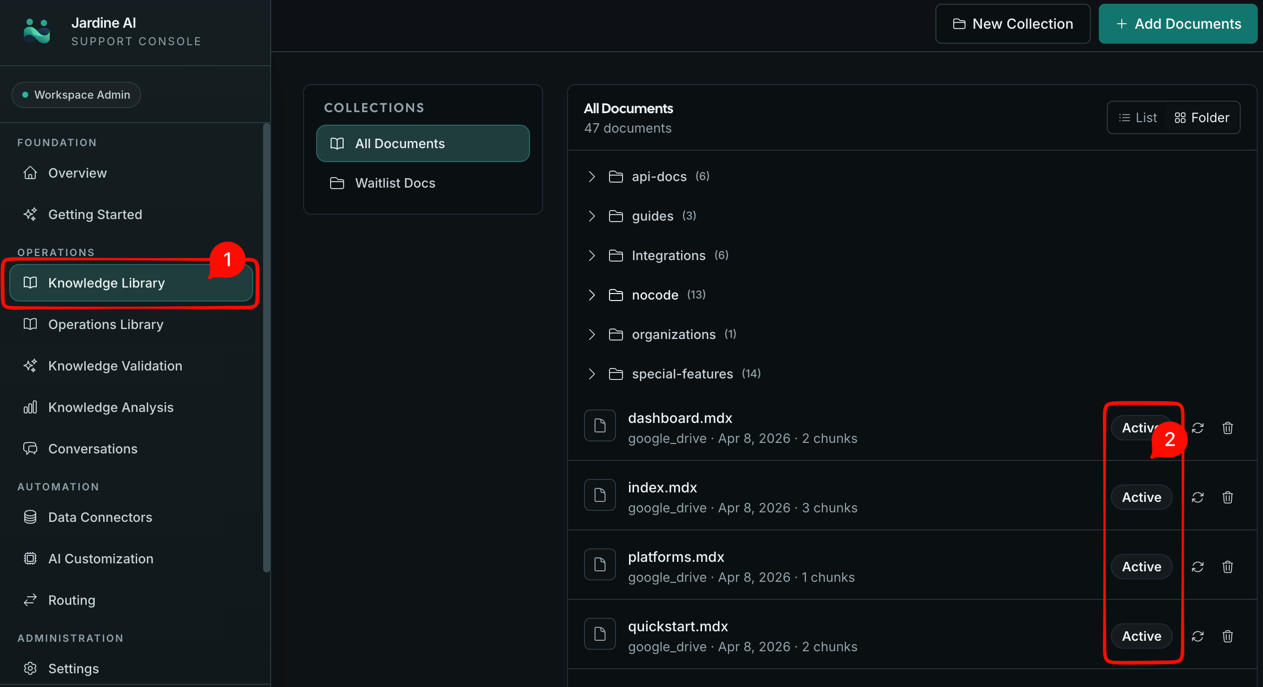
In the current dashboard, knowledge content is organized into collections. Collections help you group material logically so teams can manage scope, ownership, and maintenance without chaos.
From the upload flow, you can add content in three primary ways:
- file uploads,
- text documents,
- Google Drive imports.
Each method has a place. File upload is good for existing policy and product docs. Text entries are fast for tightly scoped operational guidance. Google Drive import works when your source of truth already lives there and you want sync-driven updates.
You can also create, rename, and edit collections, which is useful as your documentation set grows. Strong collection hygiene makes troubleshooting faster because you can narrow investigations to the most relevant document scope.
How Ingestion Affects Support Behavior
When content is added, it is ingested and assigned a status. Status is not just metadata; it tells you whether the system can actually use the document.
If a document is active, it is available for grounding. If it is still processing, pending, failed, or archived, behavior can differ from expectations.
Many early quality issues come from assuming “uploaded” means “ready.” In practice, you should always verify status before evaluating response quality.
When needed, re-ingest specific documents after updates. This is especially important after policy changes where older wording could cause wrong or stale responses.
A Practical Content Strategy
A strong library starts small and grows deliberately.
Begin with the support topics your team sees most often: billing basics, plan logic, account changes, onboarding steps, and high-frequency troubleshooting patterns. Then expand into lower-volume edge cases.
Write or edit documents in customer-facing language. If a source reads like internal shorthand, the resulting answers usually feel unclear to customers. Keep instructions explicit, conditions concrete, and policy constraints unambiguous.
Avoid duplicates that say slightly different things. Contradictory content is one of the fastest ways to create uncertain behavior.
A useful maintenance habit is to review documents that repeatedly appear in weak-answer incidents. If the same source keeps showing up in problematic conversations, rewrite that source first before adjusting policy.
Day-to-Day Operations in Library
In active support environments, teams usually run a simple weekly rhythm:
- Add or update docs for policy and product changes.
- Check ingestion status for new material.
- Re-ingest affected docs where needed.
- Archive stale content that should no longer influence answers.
- Re-run validation scenarios for high-risk topics.
This loop keeps quality stable even as your product evolves.
As your collections grow, use consistent naming and keep scope intentional. For example, separate billing policy from troubleshooting playbooks instead of combining everything into one giant collection. Clear boundaries make it easier to understand why specific evidence was retrieved later.
Common Mistakes to Avoid
The first mistake is uploading too much too quickly. A large, uncurated dump creates noise and makes result quality harder to diagnose.
The second mistake is keeping outdated policy versions active. If old and new policies coexist, Jardine may retrieve conflicting guidance.
The third mistake is treating ingestion failures as harmless. Failed documents are often quiet quality regressions waiting to show up in production conversations.
The fourth mistake is writing for internal teams only. Support AI outputs need customer-usable clarity.
How Library Connects to the Rest of the Product
Library is the factual base. Validation is where you test that base under realistic prompts. Analysis is where you monitor whether the base stays healthy over time.
If response quality drops, start with library content and ingestion status before touching advanced routing or connector logic. In many cases, the fastest fix is a better source document, not a more complex rule.
When your library is strong, everything else becomes easier. Routing decisions are cleaner, escalations are more intentional, and operators spend less time guessing why a response went wrong.
That is why high-performing teams treat Library as a living operational asset, not a one-time setup step.
After updating content, continue with Validation Workspace to pressure-test behavior before broad rollout.